Examples
Digital hologram of a single cell
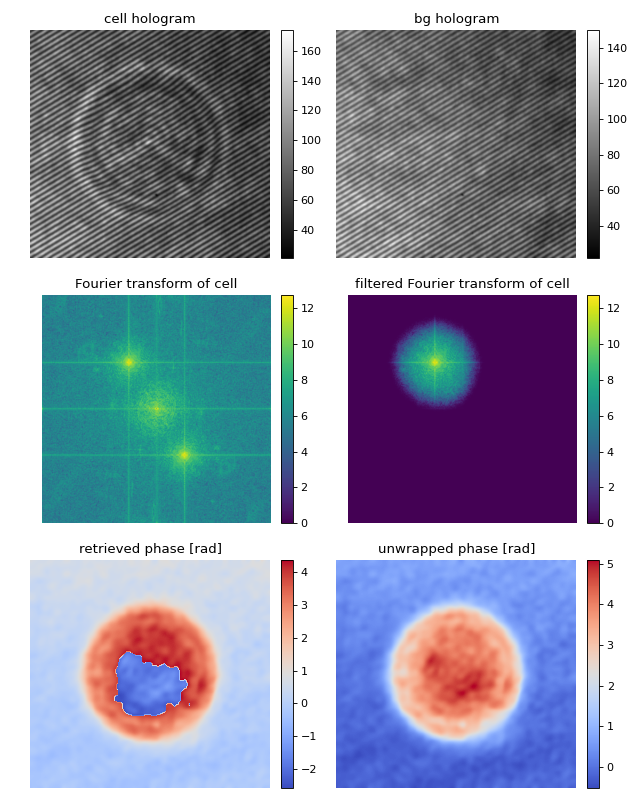
This example illustrates how qpretrieve can be used to analyze digital holograms. The hologram of a single myeloid leukemia cell (HL60) was recorded using off-axis digital holographic microscopy (DHM). Because the phase-retrieval method used in DHM is based on the discrete Fourier transform, there always is a residual background phase tilt which must be removed for further image analysis. The setup used for recording these data is described in reference [SSM+15].
Note that the fringe pattern in this particular example is over-sampled in real space, which is why the sidebands are not properly separated in Fourier space. Thus, the filter in Fourier space is very small which results in a very low effective resolution in the reconstructed phase.
 1import matplotlib.pylab as plt
 2import numpy as np
 3import qpretrieve
 4from skimage.restoration import unwrap_phase
 5
 6# load the experimental data
 7edata = np.load("./data/hologram_cell.npz")
 8
 9holo = qpretrieve.OffAxisHologram(data=edata["data"])
10holo.run_pipeline(
11    # For this hologram, the "smooth disk"
12    # filter yields the best trade-off
13    # between interference from the central
14    # band and image resolution.
15    filter_name="smooth disk",
16    # Set the filter size to half the distance
17    # between the central band and the sideband.
18    filter_size=1/2)
19bg = qpretrieve.OffAxisHologram(data=edata["bg_data"])
20bg.process_like(holo)
21
22phase = (holo.get_data_with_input_layout(holo.phase) -
23         bg.get_data_with_input_layout(bg.phase))
24fft_origin = holo.get_data_with_input_layout(holo.fft_origin)
25fft_filtered = holo.get_data_with_input_layout(holo.fft_filtered)
26
27
28# plot the intermediate steps of the analysis pipeline
29fig = plt.figure(figsize=(8, 10))
30
31ax1 = plt.subplot(321, title="cell hologram")
32map1 = ax1.imshow(edata["data"], interpolation="bicubic", cmap="gray")
33plt.colorbar(map1, ax=ax1, fraction=.046, pad=0.04)
34
35ax2 = plt.subplot(322, title="bg hologram")
36map2 = ax2.imshow(edata["bg_data"], interpolation="bicubic", cmap="gray")
37plt.colorbar(map2, ax=ax2, fraction=.046, pad=0.04)
38
39ax3 = plt.subplot(323, title="Fourier transform of cell")
40map3 = ax3.imshow(np.log(1 + np.abs(fft_origin)), cmap="viridis")
41plt.colorbar(map3, ax=ax3, fraction=.046, pad=0.04)
42
43ax4 = plt.subplot(324, title="filtered Fourier transform of cell")
44map4 = ax4.imshow(np.log(1 + np.abs(fft_filtered)), cmap="viridis")
45plt.colorbar(map4, ax=ax4, fraction=.046, pad=0.04)
46
47ax5 = plt.subplot(325, title="retrieved phase [rad]")
48map5 = ax5.imshow(phase, cmap="coolwarm")
49plt.colorbar(map5, ax=ax5, fraction=.046, pad=0.04)
50
51ax6 = plt.subplot(326, title="unwrapped phase [rad]")
52map6 = ax6.imshow(unwrap_phase(phase), cmap="coolwarm")
53plt.colorbar(map6, ax=ax6, fraction=.046, pad=0.04)
54
55# disable axes
56[ax.axis("off") for ax in [ax1, ax2, ax3, ax4, ax5, ax6]]
57
58plt.tight_layout()
59plt.show()
Filter visualization
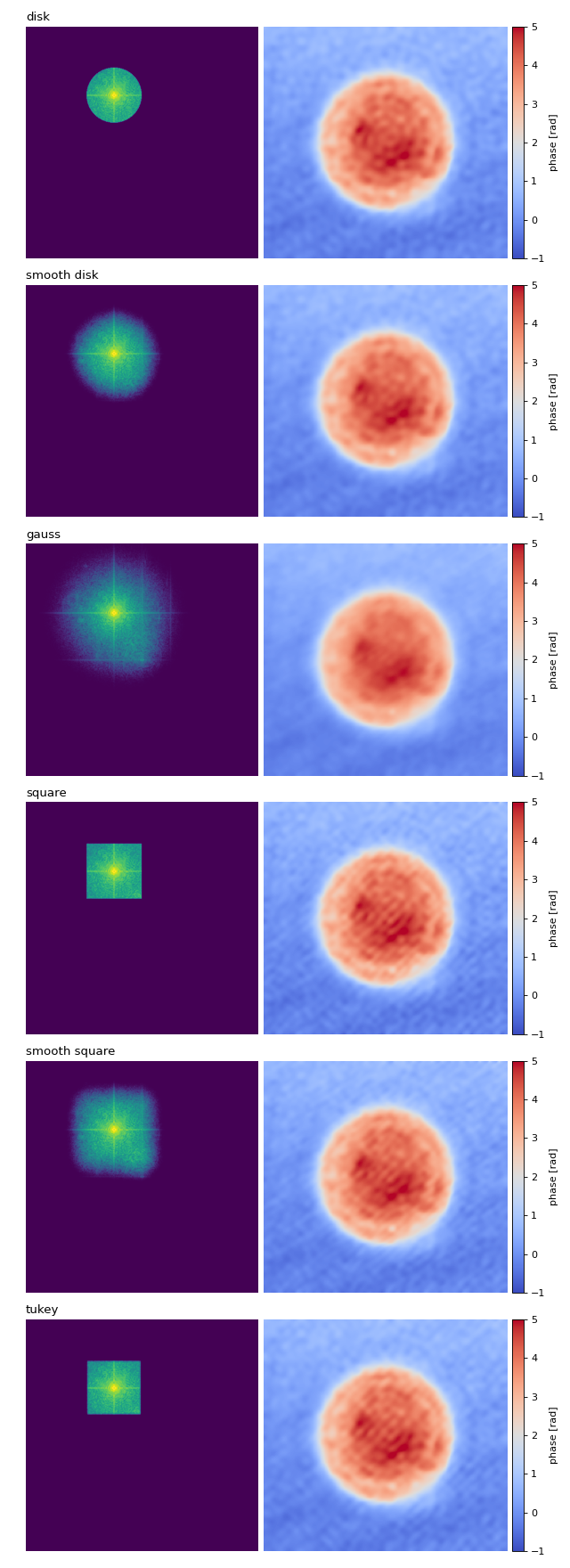
This example visualizes the different Fourier filtering masks available in qpretrieve.
 1import matplotlib.pylab as plt
 2import numpy as np
 3import qpretrieve
 4from skimage.restoration import unwrap_phase
 5
 6# load the experimental data
 7edata = np.load("./data/hologram_cell.npz")
 8
 9prange = (-1, 5)
10frange = (0, 12)
11
12results = {}
13
14for fn in qpretrieve.filter.available_filters:
15    holo = qpretrieve.OffAxisHologram(data=edata["data"])
16    holo.run_pipeline(
17        filter_name=fn,
18        # Set the filter size to half the distance
19        # between the central band and the sideband.
20        filter_size=1/2)
21    bg = qpretrieve.OffAxisHologram(data=edata["bg_data"])
22    bg.process_like(holo)
23    # use the 2d layout
24    phase = unwrap_phase(holo.get_data_with_input_layout(holo.phase) -
25                         bg.get_data_with_input_layout(bg.phase))
26    mask = np.log(1 + np.abs(
27        holo.get_data_with_input_layout(holo.fft_filtered)))
28    results[fn] = mask, phase
29
30num_filters = len(results)
31
32# plot the properties of `qpi`
33fig = plt.figure(figsize=(8, 22))
34
35for row, name in enumerate(results):
36    ax1 = plt.subplot(num_filters, 2, 2*row+1)
37    ax1.set_title(name, loc="left")
38    ax1.imshow(results[name][0], vmin=frange[0], vmax=frange[1])
39
40    ax2 = plt.subplot(num_filters, 2, 2*row+2)
41    map2 = ax2.imshow(results[name][1], cmap="coolwarm",
42                      vmin=prange[0], vmax=prange[1])
43    plt.colorbar(map2, ax=ax2, fraction=.046, pad=0.02, label="phase [rad]")
44
45    ax1.axis("off")
46    ax2.axis("off")
47
48plt.tight_layout()
49plt.show()
Adequate resolution-scaling via cropping in Fourier space
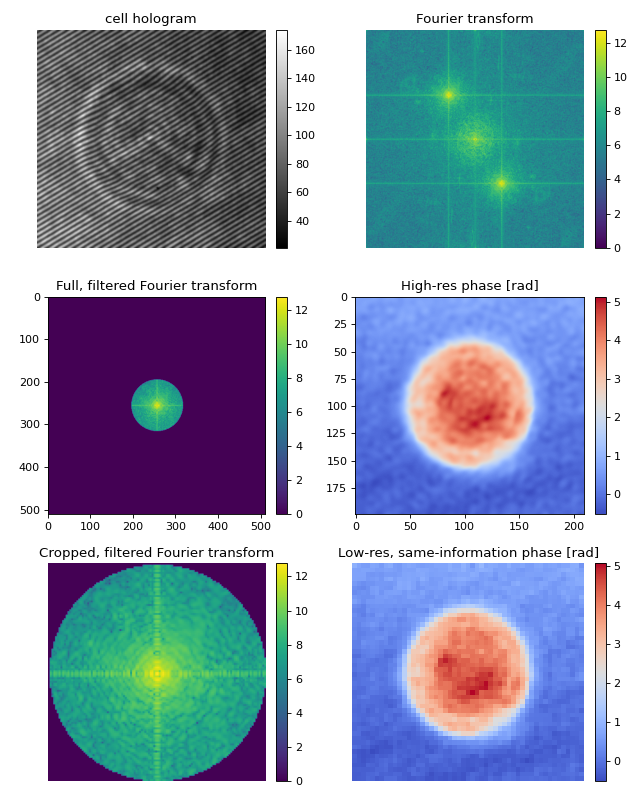
Applying filters in Fourier space usually means setting a larger fraction of the data in Fourier space to zero. This can considerably slow down your analysis, since the inverse Fouier transform is taking into account a lot of unused frequencies.
By cropping the Fourier domain, the inverse Fourier transform will be faster. The result is an image with fewer pixels (lower resolution), that contains the same information as the unscaled (not cropped in Fourier space) image. There are possibly two disadvantages of performing this cropping operation:
The resolution of the output image (pixel size) is not the same as that of the input (interference) image. Thus, you will have to adapt your colocalization scheme.
If you are using a filter with a non-binary mask (e.g. gauss), then you will lose (little) information when cropping in Fourier space.
What happens when you set filter_name=”smooth disk”? Cropping with scale_to_filter=True is too narrow, because now there are higher frequencies contributing to the final image. To include them, you can set scale_to_filter to a float, e.g. scale_to_filter=1.2.
 1import matplotlib.pylab as plt
 2import numpy as np
 3import qpretrieve
 4from skimage.restoration import unwrap_phase
 5
 6# load the experimental data
 7edata = np.load("./data/hologram_cell.npz")
 8
 9results = []
10
11holo = qpretrieve.OffAxisHologram(data=edata["data"])
12bg = qpretrieve.OffAxisHologram(data=edata["bg_data"])
13ft_orig = np.log(1 + np.abs(
14    holo.get_data_with_input_layout(holo.fft_origin)), dtype=float)
15
16holo.run_pipeline(filter_name="disk", filter_size=1 / 2,
17                  scale_to_filter=False)
18bg.process_like(holo)
19phase_highres = unwrap_phase(holo.get_data_with_input_layout(holo.phase) -
20                             bg.get_data_with_input_layout(bg.phase))
21ft_highres = np.log(1 + np.abs(
22    holo.get_data_with_input_layout(holo.fft.fft_used)), dtype=float)
23
24holo.run_pipeline(filter_name="disk", filter_size=1 / 2,
25                  scale_to_filter=True)
26bg.process_like(holo)
27phase_scalerad = unwrap_phase(holo.get_data_with_input_layout(holo.phase) -
28                              bg.get_data_with_input_layout(bg.phase))
29ft_scalerad = np.log(1 + np.abs(
30    holo.get_data_with_input_layout(holo.fft.fft_used)), dtype=float)
31
32# plot the intermediate steps of the analysis pipeline
33fig = plt.figure(figsize=(8, 10))
34
35ax1 = plt.subplot(321, title="cell hologram")
36map1 = ax1.imshow(edata["data"], interpolation="bicubic", cmap="gray")
37plt.colorbar(map1, ax=ax1, fraction=.046, pad=0.04)
38
39ax2 = plt.subplot(322, title="Fourier transform")
40map2 = ax2.imshow(ft_orig, cmap="viridis")
41plt.colorbar(map2, ax=ax2, fraction=.046, pad=0.04)
42
43ax3 = plt.subplot(323, title="Full, filtered Fourier transform")
44map3 = ax3.imshow(ft_highres, cmap="viridis")
45plt.colorbar(map3, ax=ax3, fraction=.046, pad=0.04)
46
47ax4 = plt.subplot(324, title="High-res phase [rad]")
48map4 = ax4.imshow(phase_highres, cmap="coolwarm")
49plt.colorbar(map4, ax=ax4, fraction=.046, pad=0.04)
50
51ax5 = plt.subplot(325, title="Cropped, filtered Fourier transform")
52map5 = ax5.imshow(ft_scalerad, cmap="viridis")
53plt.colorbar(map5, ax=ax5, fraction=.046, pad=0.04)
54
55ax6 = plt.subplot(326, title="Low-res, same-information phase [rad]")
56map6 = ax6.imshow(phase_scalerad, cmap="coolwarm")
57plt.colorbar(map6, ax=ax6, fraction=.046, pad=0.04)
58
59# disable axes
60[ax.axis("off") for ax in [ax1, ax2, ax5, ax6]]
61
62plt.tight_layout()
63plt.show()
Fourier Transform speed benchmarks for OAH
Benchmark your own data
You can use this script to benchmark your data and find the optimum batch
size and FFTFilter. Just load your data in place of the input_data_3d
and input_data_bg_3d.
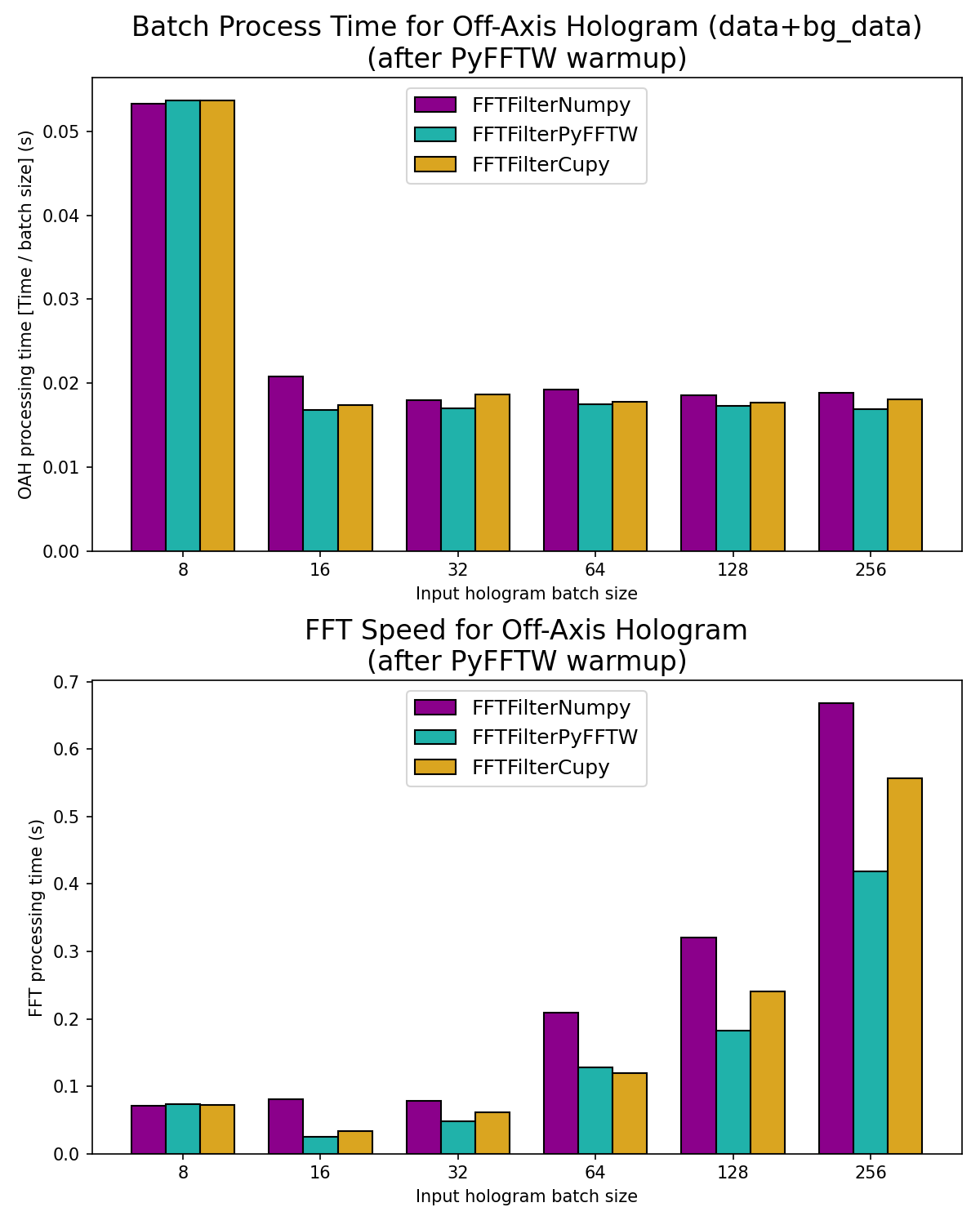
This example visualizes the speed for different batch sizes for the available FFT Filters.
In the first graph “Batch Processing Time”,
the y-axis shows the speed - normalised by batch size -
of an Off-Axis Hologram class OffAxisHologram,
including background data processing. From this graph, we can conclude that:
Optimum batch size is between 32 and 256 for 256x256pix imgs (incl padding), but will be limited by your computer’s RAM.
- Some Notes:
The batch size is the size of the raw hologram 3D stack in z.
Each pipeline runs 4 FFTs (Data FFT and iFFT + background Data FFT + iFFT). For example, batch size of 8 runs 8*4=32 FFTs.
For CuPy, the data transfer between GPU and CPU is currently very inefficient.
In the second graph “FFT Speed for Off-Axis Hologram”, the y-axis shows the speed of a single FFT. From this graph, we can conclude that:
Optimum batch size for CuPy and PyFFTW is between 16 and 64 for 256x256pix imgs (incl padding). This may change depending on your machine.
Notes on why each FFT method is run twice
In the first run, python must load extra modules, which makes benchmarking unreliable. Therefore, the second run is used for timing.
This is especially important for PyFFTW, as PyFFTW generates a “wisdom” on its first run, which defines the fastest way to do subsequent Fourier transforms. A wisdom is generated for each batch size. Click here for more information on exporting and importing wisdoms with PyFFTW.
  1import time
  2import matplotlib.pylab as plt
  3import numpy as np
  4import qpretrieve
  5from qpretrieve.data_array_layout import convert_data_to_3d_array_layout
  6from qpretrieve.fourier import FFTFilterNumpy, FFTFilterPyFFTW, FFTFilterCupy
  7
  8# load the experimental data
  9edata = np.load("./data/hologram_cell.npz")
 10
 11n_transforms_list = [8, 16, 32, 64, 128, 256]
 12subtract_mean = True
 13padding = True
 14
 15# the first run is always used as a warmup
 16fft_interfaces = [FFTFilterNumpy, FFTFilterNumpy]
 17if FFTFilterPyFFTW is not None:
 18    fft_interfaces.extend([FFTFilterPyFFTW, FFTFilterPyFFTW])
 19if FFTFilterCupy is not None:
 20    fft_interfaces.extend([FFTFilterCupy, FFTFilterCupy])
 21
 22filter_name = "disk"
 23filter_size = 1 / 2
 24
 25# load and prep the data
 26data_2d, data_2d_bg = edata["data"].copy(), edata["bg_data"].copy()
 27input_data_3d, _ = convert_data_to_3d_array_layout(data_2d)
 28input_data_bg_3d, _ = convert_data_to_3d_array_layout(data_2d_bg)
 29
 30speed_batch_norms, speed_ffts = {}, {}
 31print("Each FFTFilter will run twice, as a warmup run is "
 32      "required for comparison.")
 33for fft_interface in fft_interfaces:
 34    results_batch, results_fft = {}, {}
 35    for n_transforms in n_transforms_list:
 36        print(f"Running {n_transforms} transforms with "
 37              f"{fft_interface.__name__}")
 38
 39        # create batches
 40        data_3d = np.repeat(input_data_3d, repeats=n_transforms, axis=0)
 41        data_3d_bg = np.repeat(input_data_bg_3d, repeats=n_transforms, axis=0)
 42
 43        assert data_3d.shape == data_3d_bg.shape == (
 44            n_transforms, edata["data"].shape[0], edata["data"].shape[1])
 45
 46        t0 = time.perf_counter()
 47        holo = qpretrieve.OffAxisHologram(data=data_3d,
 48                                          fft_interface=fft_interface,
 49                                          subtract_mean=subtract_mean,
 50                                          padding=padding)
 51        t_fft = time.perf_counter()
 52        holo.run_pipeline(filter_name=filter_name, filter_size=filter_size)
 53        bg = qpretrieve.OffAxisHologram(data=data_3d_bg)
 54        bg.process_like(holo)
 55        t_batch = time.perf_counter()
 56        results_batch[n_transforms] = t_batch - t0
 57        results_fft[n_transforms] = t_fft - t0
 58
 59    speed_batch_norm = [t / bsize for bsize, t in results_batch.items()]
 60    speed_fft = [t for t in results_fft.values()]
 61    # the initial PyFFTW run (incl wisdom calc is overwritten here)
 62    speed_batch_norms[fft_interface.__name__] = speed_batch_norm
 63    speed_ffts[fft_interface.__name__] = speed_fft
 64
 65# setup figure
 66width = 0.25  # the width of the bars
 67x_pos = np.arange(len(n_transforms_list))
 68colors = ["darkmagenta", "lightseagreen", "goldenrod"]
 69edgecolor = "k"
 70legend_loc = "upper center"
 71fontsize = 16
 72
 73fig, axes = plt.subplots(2, 1, figsize=(8, 10))
 74ax1, ax2 = axes
 75
 76# setup plot for batch speed comparison
 77multiplier = 0  # for the x_label positions
 78for (name, speed), color in zip(speed_batch_norms.items(), colors):
 79    offset = width * multiplier
 80    ax1.bar(x_pos + offset, speed, width, label=name,
 81            color=color, edgecolor=edgecolor)
 82    multiplier += 1
 83ax1.set_xticks(x_pos + width, labels=n_transforms_list)
 84ax1.set_xlabel("Input hologram batch size")
 85ax1.set_ylabel("OAH processing time [Time / batch size] (s)")
 86ax1.legend(loc=legend_loc, fontsize="large")
 87ax1.set_title("Batch Process Time for Off-Axis Hologram "
 88              "(data+bg_data)\n(after PyFFTW warmup)", fontsize=fontsize)
 89
 90# setup plot for fft speed comparison
 91multiplier = 0  # for the x_label positions
 92for (name, speed), color in zip(speed_ffts.items(), colors):
 93    offset = width * multiplier
 94    ax2.bar(x_pos + offset, speed, width, label=name,
 95            color=color, edgecolor=edgecolor)
 96    multiplier += 1
 97ax2.set_xticks(x_pos + width, labels=n_transforms_list)
 98ax2.set_xlabel("Input hologram batch size")
 99ax2.set_ylabel("FFT processing time (s)")
100ax2.legend(loc=legend_loc, fontsize="large")
101ax2.set_title("FFT Speed for Off-Axis Hologram\n(after PyFFTW warmup)",
102              fontsize=fontsize)
103
104plt.tight_layout()
105# plt.show()
106plt.savefig("fft_batch_speeds.png", dpi=150)